X-Arcade Tri-Mode Firmware Update - Download & Instructions
This applies to X-Arcade products with the newest Tri-Mode PCBs in them only.
You can check if you have a Tri-Mode PCB by switching to mode 4 which will make the X-Arcade act like a gamepad instead of a keyboard.
The new Tri-Mode model X-Arcades and PCBs can be firmware upgraded. As new features come out we'll offer the newest version for download here.
FIRMWARE UPDATE INSTRUCTIONS
NOTE:Do not unplug the X-Arcade from the USB while the firmware is being updated! You must either update the firmware or Click Cancel to exit firmware update mode.
NOTE: YOU CAN RIGHT CLICK SAVE AS FOR FIRMWARE LINK IF ANY ISSUES WITH SECURITY OR LINK NOT WORKING. <http://www.xgameroom.com/service/ServiceFiles/Tri-mode%20PCB/Tri-Mode%20FW%20V19.4%20Update.zip>
OR PASTE THIS URL
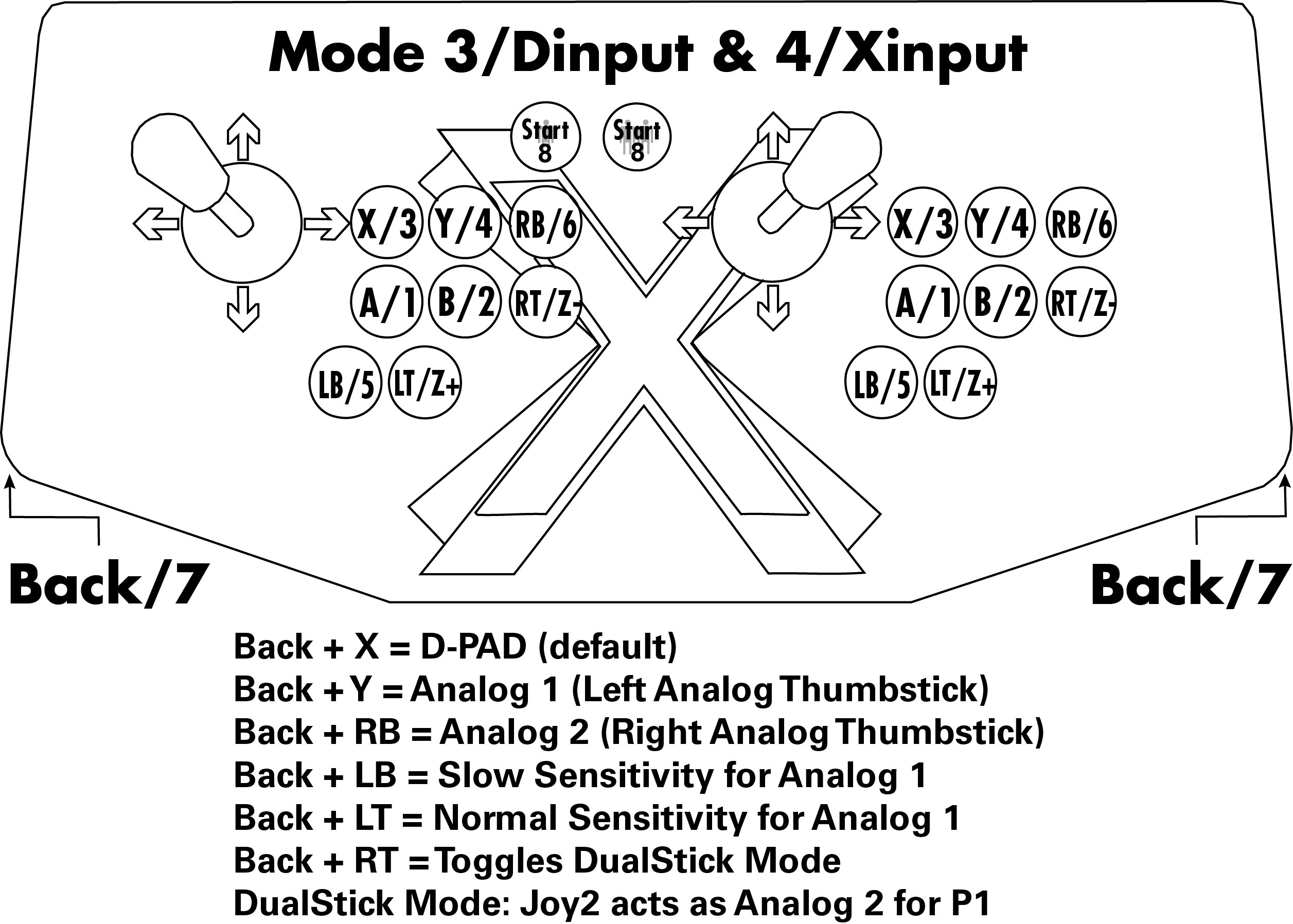
- Download the newest V19.4 firmware package here, it includes the firmware updating software and newest firmware. Note that this version changes the button layout from modes 3 and 4 as shown here.
- Extract all of the contents in the downloaded .zip file to a folder on your computer, such as your desktop. Do not run it directly from the zip file.
- In the folder, run the Xgaming Firmware Updater.exe
- With the X-Arcade unplugged from your computer, hold Start buttons 1 & 2 simultaneously while plugging it into the USB port of your computer (Note: For firmware 19.3 or above, you will now need to hold the Programming/Mode (PM) button on the back of the controller while plugging it in instead) The software should now recognize it, see troubleshooting below if it does not.
- Click the Open FW File button, and it will allow you to choose the firmware file ( .MTP found in the same folder as the updating software).
- Do not unplug the X-Arcade from the USB while the firmware is being updated! Press the Flash button, and wait until all of the bubbles change from red to green at which point you will hear the disconnect sound on your computer letting you know it completed successfully. This can take up to 30 seconds.
TROUBLESHOOTING
- Test your X-Arcadeto make sure your buttons are all working especially your Start buttons which enable firmware update mode.
- For newer firmware (19.3 or above), you hold the Programming/Mode (PM) button (on the back of the controller) while plugging it in to enter firmware update mode. For older firmware, you hold Start buttons 1 & 2 simultaneously while plugging it in instead. If one way doesn't work try the other!
- Do not run the firmware update directly from the zip file. Instead extract all of the contents in the downloaded .zip file to a folder on your computer, such as your desktop.
- Make sure the X-Arcade is plugged directly into a USB port on the back of your computer, not the front or in a USB hub.
- Disable antivirus and try again if you still have trouble.
- If you open the Firmware Updater software and it says the controller is unrecognized, unplug it while that message is on the screen and run the Updater with the controller unplugged. Then when it asks for the controller plug it in again and it should find it.
- Solo Controllers: There is no start button 2 on the X-Arcade Solo, so you will need to temporarily swap J2 and J6 and hold buttons 3 and 6 while plugging it in. The new firmware will change which buttons are used for the firmware update in the future to the programming button on the back instead.
- CANNOT LOAD FIRMWARE, FLASH FIRMWARE ERROR. SEE HERE

OLDER FW VERSIONS:
Source article: <https://support.xgaming.com/support/solutions/articles/12000051593-x-arcade-tri-mode-firmware-update-download-instructions>
Programming button does not respond after a completed firmware update
These checks apply to an X-Arcade Tri-Mode PCB, not an Arcade2TV-XR or XR MAX. Wait for the firmware updater to finish successfully before disconnecting anything.
- Unplug and reconnect the controller normally without holding any buttons. Holding PM while connecting is the firmware-update entry procedure, not ordinary key programming.
- Select Mode 1 and test the joystick/buttons first using the X-Arcade test instructions.
- For programming, move the rear switch to Mode 2, open the Tri-Mode programming software, then press the rear PM button. The power light should turn off and the software should recognize programming mode.
- If PM still does not enter programming mode, send support the exact controller/PCB model, firmware filename and version, the updater's final completion/error message, and a short video showing the Mode 2 switch and PM/light behavior. Do not repeatedly flash an unidentified file.
This is a staff-recommended diagnostic sequence; the reporting customer has not yet confirmed recovery. See the Tri-Mode PCB guide for the complete programming procedure.