Wii and Wii U Wireless Adapter
Download Manual | Printable Layout | Instructions | Troubleshooting
IMPORTANT – READ BEFORE INSTALLATION
- You must make sure you screw in BOTH serial cable screws on both the adapter and controller sides.
- Make sure to note the section on Digital/Analog, which will alleviate many issues you may encounter.
- Programming is for the PC/Mac™ only, it has no function on game consoles.
- The wireless WiiU adapter works with the original PS2 only adapter and newest 5in1 adapter with permanently attached cables (it will not work with the older 5in1 with detachable cables).
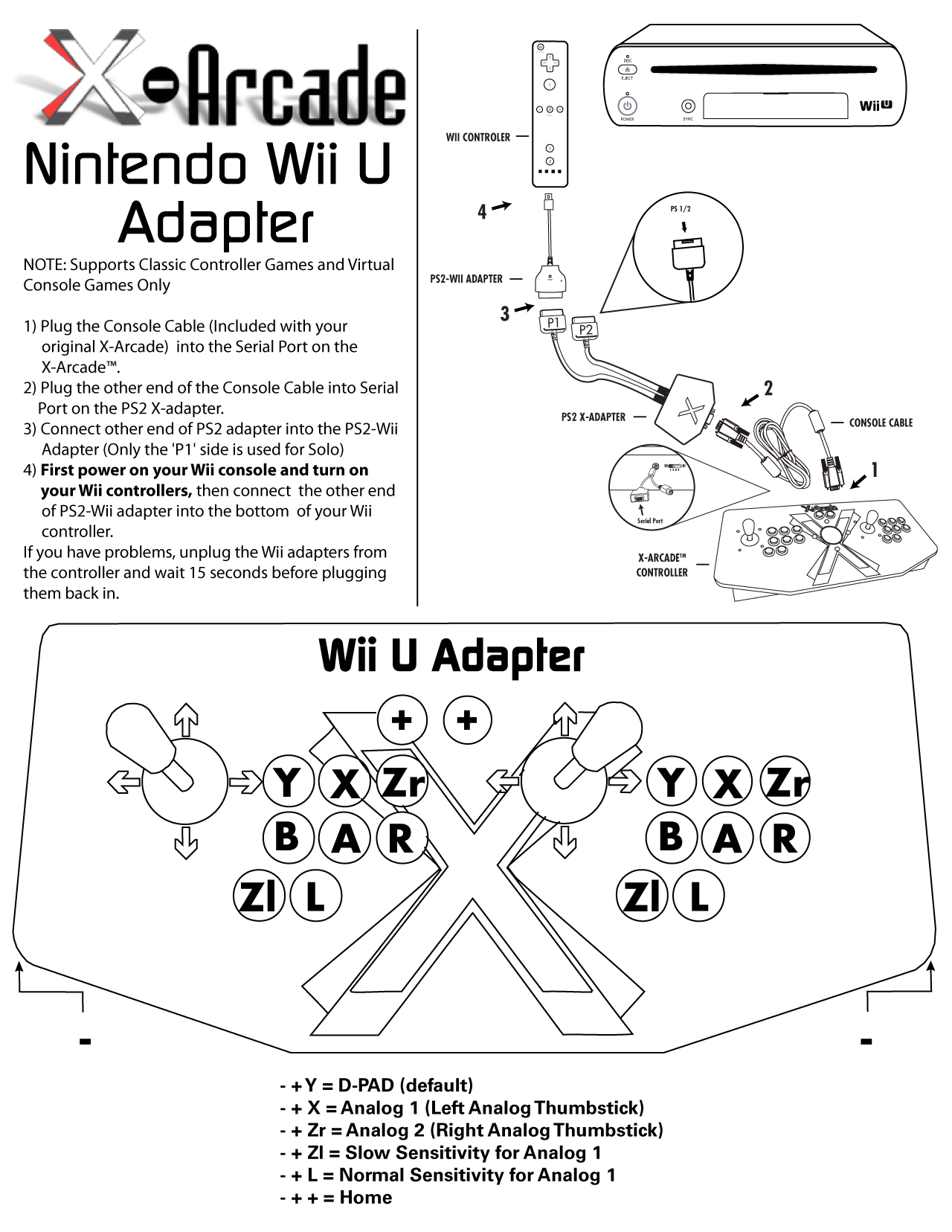
- The X-Arcade WiiU adapter must be connected to a Wiimote that is on and synced to the console.
- Nintendo Wii™: The wireless adapter only works with games that have Classic Controller support. This includes all GameCube games, Virtual Console downloadable games, and the list of Wii™ games here: List of Wii games with GameCube and/or Classic Controller support.
OPERATION WITH GAME CONSOLES
On gaming consoles, the unit operates just like a standard game pad, with buttons assigned to the arcade buttons. See the appendix for the appropriate button legend for your game system. You can play with four players using two X-Arcades™ and two sets of X-Adapters™.
Digital vs. Analog Control Overview: Handheld game pad controllers for newer game consoles feature both digital and analog controlling devices. On the PlayStation DualShock™ controller, for example, there is a D-pad and two analog thumb sticks. Most games use the D-pad and/or left thumbstick to operate a game. The X-Arcade™ supports only one digital joystick per player, therefore adjustments need to be made to select whether this joystick functions as the D-pad or the left analog thumbstick. Switching between digital and analog control is easy, and is slightly different for each console. See the key legends for directions on switching between analog and digital on each console, but in general:
Modifier + Button 1 (Top-left) = Digital (D-PAD) Modifier + Button 2 (Top-middle) = Analog 1 (primary thumbstick) Modifier + Button 3 (Top-right) = Analog 2 (secondary thumbstick)
Analog Tilt Sensitivity While using Analog 1 mode (Select+Button 2) you can change how sensitive the movement is from normal full-tilt (default) to half-tilt sensitivity. Half-tilt sensitivity would be equal to moving the analog thumbstick on your gamepad to about halfway in any direction instead of fully (full-tilt). This is useful for games that you need more precise movement in, for example in a racing game, or to make your character move slower in your game.
Tilt Sensitivity Mode Toggle: Modifier + Button 7 = Half-Tilt Sensitivity Modifier + Button 8 = Full-Tilt Sensitivity (default)
TROUBLESHOOTING
- The X-Arcade WiiU adapter must be connected to a Wiimote that is on and synced to the console. The light on the X-Arcade should also be on. At this point to test if the controller is working on your Wii™ or WiiU™ console in general, change the X-Arcade™ to Analog 1 mode and see if it is able to move the hand cursor around the main system menu. If so, your hardware is all working correctly.
- The first thing you want to do is test the X-Arcade™ on your PC using the X-Arcade™ Test Utility Program to check that it is being recognized by your PC properly. If your controller works in the X-Arcade™ Test Program, then your X-Arcade™ is fine. Run the X-Arcade™ Test Program.
- Make sure all of your connections are tight and secure, including all of the screws on the console cable(needed for ground).
- If you find that the controller is not responding for any reason, unplug the Wii adapters from the Wii controllers, wait 15 seconds, and then plug them back in.
- If you are still having trouble but your X-Arcade is working on the PC with our test program, try the X-Arcade on a PlayStation 1 or 2 console to see if it works there (if possible). If you have a PlayStation 1 or 2 game pad, please also test if it works on the WiiU wireless adapter. This will help troubleshoot the cause. Remember that the wireless WiiU adapter works with the original PS2 only adapter and newest 5in1 adapter with permanently attached cables (it will not work with the older 5in1 with detachable cables).
I CAN'T MOVE AROUND IN THE GAME MENU! The game you are playing may require that you use the digital control to navigate the menu, you might be in analog mode (or vice-versa). Change the mode of your joystick as instructed.
WHY CAN'T I PLAY SOME GAMES ON MY WII? Most games on the Wii ™ require the use of the motion controller, and you certainly don't want to be throwing the X-Arcade™ around, something or someone WILL get damaged! But all Virtual Console games and GameCube™ games can be played with the X-Arcade™, as well as Wii™ games that have Classic controller support. If the game lists support for Classic controllers, then your X-Arcade™ will work with it.
MY CHARACTER IS MOVING SLOWLY! You are in Slow Tilt Sensitivity Mode.
Source article: <https://support.xgaming.com/support/solutions/articles/12000003229-wii-and-wii-u-wireless-adapter->
Legacy adapter availability
This is legacy documentation for owners of the matching Wii / Wii U wireless adapter. In March 2026, X-Arcade support stated that this adapter was no longer sold and that it did not then offer a current official Tankstick-to-Wii-U connection path. The continued presence of this manual or a working Wii/GameCube setup does not establish current adapter stock or Wii U compatibility for a different adapter chain.
If you already own the legacy adapter, identify the exact adapter and attached-versus-detachable 5-in-1 cable variant before following the instructions above. Ask support about current options rather than buying a generic DB9 switcher or substitute based on connector shape alone. No generic switcher was validated in the reviewed inquiry, and there was no reported new Wii U installation outcome.